![FavIcon-1.png]](https://wiki.uptimehealth.com/hs-fs/hubfs/FavIcon-1.png?height=40&name=FavIcon-1.png)
-
Login to your UptimeHealth account.
-
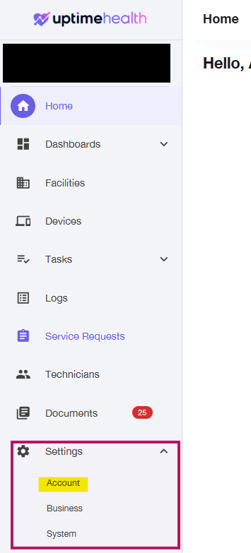
Navigate to Settings on the left hand side-bar.
-
Select Account.
-
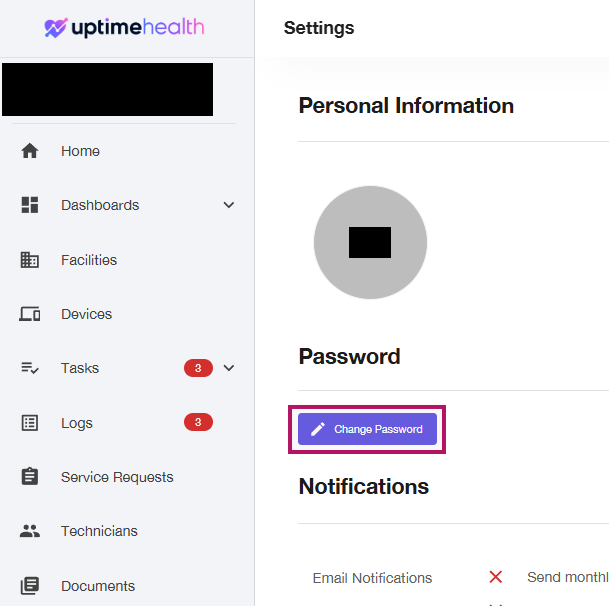
Under the Password section in the center of the screen, click Change Password.
-
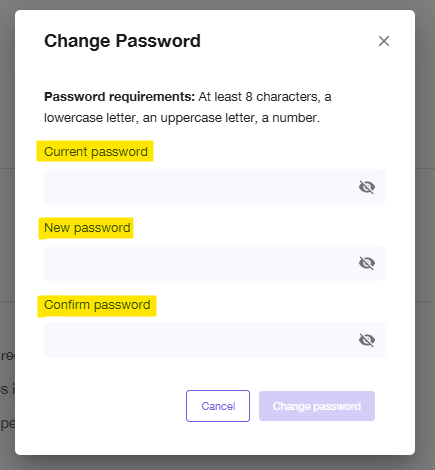
Follow the prompts to enter and save your new password.
Key Reminders
- You must complete your account setup before you can change your password.
- If you forgot your password and are unable to log in, click here to follow the password reset instructions.
- Make sure to save your new password somewhere secure for future reference.
- If you are using a temporary password, you can update it by following the steps above.
For additional assistance please email our Support Team.